
Jump by file type
Open recent files, images, videos, audio, documents, downloads, archives, APKs, and storage views without digging through one long folder list.

Utilities
Fileora is a local Android file manager for browsing, searching, and managing files already stored on your phone. It focuses on recent files, file-type categories, search, storage views, and permission-gated local file actions without a Tenshio account, internet permission, developer analytics, Crashlytics, or a developer cloud service.
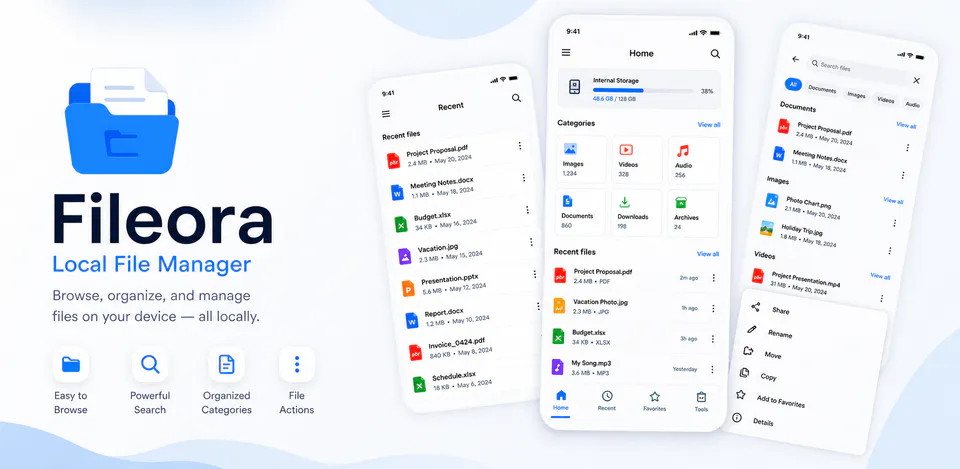
Fileora storage flow
Open recent files, images, videos, audio, documents, downloads, archives, APKs, and storage views without digging through one long folder list.
Use file names, extensions, paths, file types, dates, and sizes to narrow down what is already available on the phone.
Category shortcuts, recent-file views, and storage context make Fileora useful as a practical dashboard for cleanup, lookup, and everyday browsing.
Browse and manage device files through Android storage access without sending file names, file metadata, usage events, or crash logs to a developer server.

Storage dashboard
Fileora brings the practical entry points of a file manager together: recent items, category shortcuts, local search, file metadata, and Android storage access in one phone-first flow.
Fileora screens


Local file control
The page explains exactly why storage access is needed, what file facts are shown, and which developer services are not part of the app.
Fileora privacy
Fileora requests storage access so it can show files, folders, recent items, categories, file names, paths, dates, sizes, and local actions inside the app. The current Android build avoids internet permission, Firebase Analytics, Crashlytics, advertising ID, developer accounts, and developer-operated cloud storage.
What’s new
The Google Play ecosystem lists File Manager - Fileora under Mikael tenshio, with AppAgg capturing version 2.1.0-native dated June 30, 2026 and describing local browsing, organizing, searching, and managing files stored on an Android phone.
View all updates arrow_forwardTechnical information
Need help?
Include your device model, Android version, app version, and screenshots when possible.
Open supportEmail supportMore apps you might like
A retail catalog and inventory app for Jeaneth Store with customer browsing, cart flows, admin orders, and stock control.

A local Android sound toolkit for playback enhancement, equalizer presets, speaker checks, and private audio tests.

A precise Android metronome for tempo practice, tap tempo, beat setup, and background playback.